Drag to explore. Scroll or pinch to zoom. Open Help for keyboard controls.

Yan
OPEN
TO WORK
Let’s talk
Yan Fontão Boring view
All work

Case 034Product discovery and design

OneTool

OneTool grew out of an ecosystem connecting retailers, homeowners and service providers. The design challenge was to bring that fragmented experience around the people doing the work: independent professionals running their own service businesses.

Contribution
Product Designer
Project status
Historical product-design work
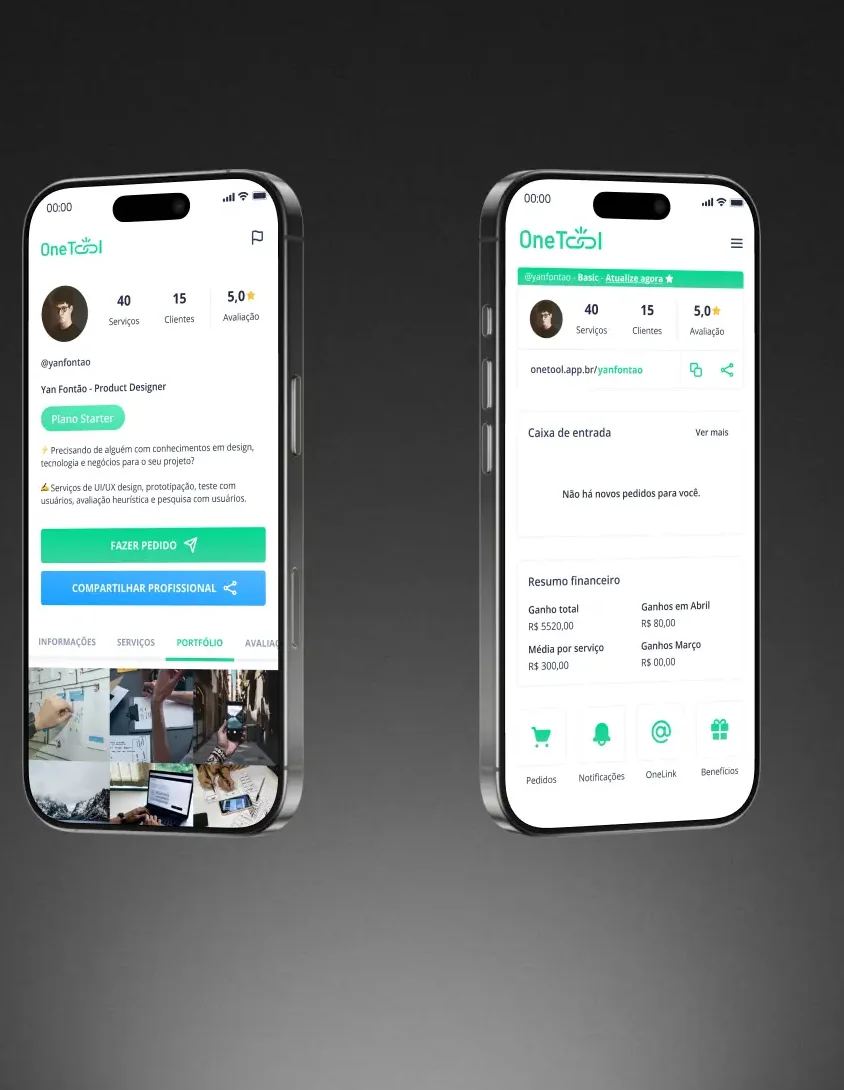
Two phones with the OneTool app: a professional’s public profile and the business dashboard.
The OneTool app, from the project’s mockup.

01

My contribution

As a Product Designer, I contributed to discovery, the value proposition, user flows and interface prototypes, working with product, development, marketing and business colleagues.
OneTool brand presented on a phone.
Original archived OneTool brand presentation.

02

Find the centre of the product

The earlier ecosystem served several audiences. The archived project brief describes difficulties with scalability, acquisition and payments happening outside the platform. The direction was to consolidate the product experience and make service providers its central audience.

That choice gave discovery a practical question: how could the product support a professional’s everyday business? The scope needed to account for presenting services, receiving requests and following the work, alongside the business’s own goals.

My contribution included user research and personas, shaping the value proposition, and developing flows and prototypes with the cross-functional team. The emphasis was on connecting the business direction to a recognisable product experience for the service provider.

03

Give each side of the work a clear place

The preserved interface designs show two related surfaces. A public profile lets a professional present services, a portfolio and reviews. The private home brings orders, notifications and a financial summary into the professional’s own workspace.

The public profile is designed to be shared. Its actions make requesting a service and sharing the professional visible, while tabs organise the information someone may want to inspect first. OneLink gives the professional a reusable entry point into that presence.

Inside the workspace, an inbox and financial summary place incoming work and business activity together. The distinction between the public profile and private home makes the audience of each screen clear. One helps a potential customer understand the professional; the other helps the professional follow their business.
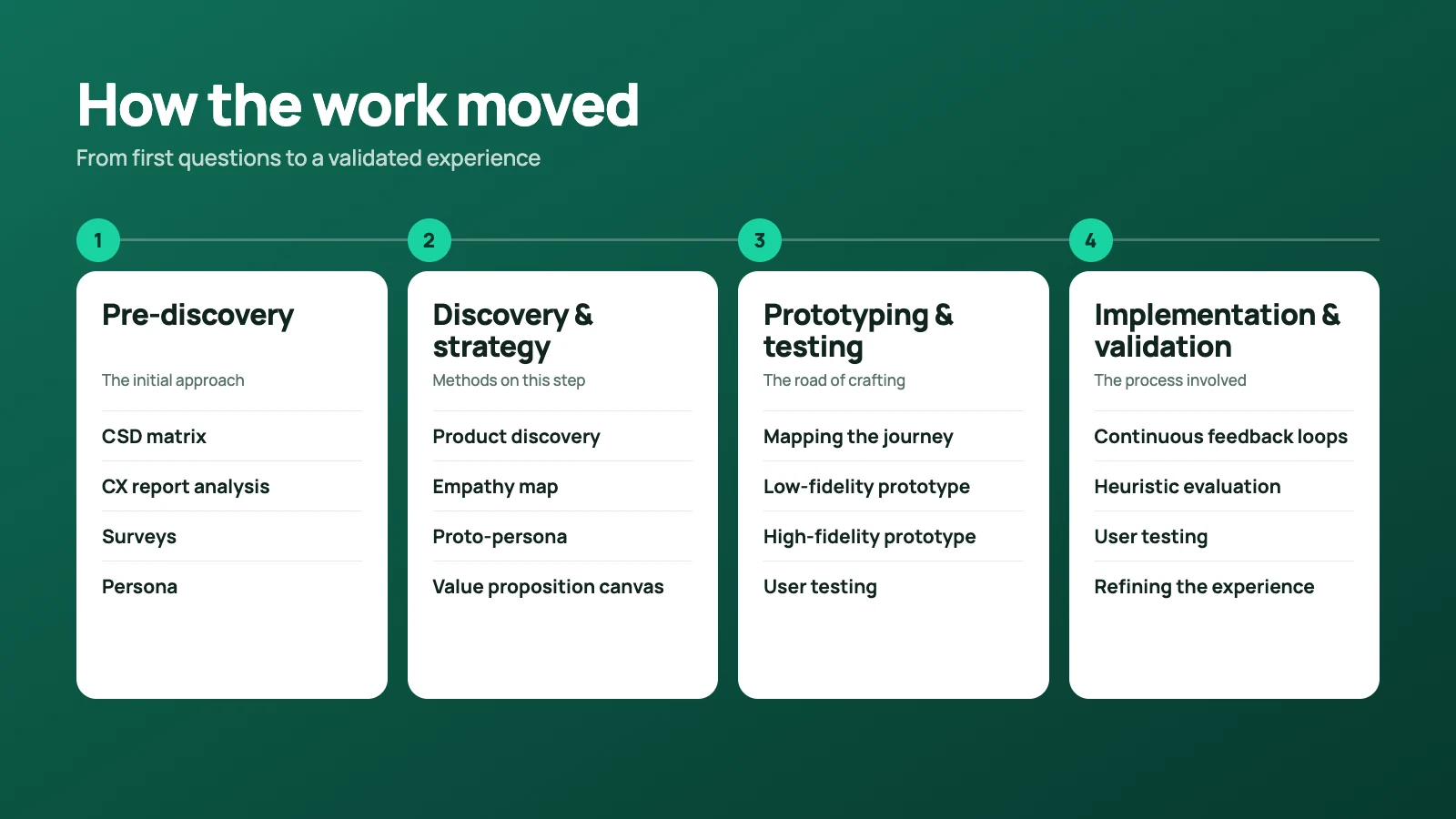
Four panels labelled Pre-discovery, Discovery and Strategy, Prototyping and Testing, and Implementation and Validation.
Process summary preserved from the archived OneTool case.

04

Use the product direction to guide the details

The provider-first direction influenced more than the navigation. It connected the professional’s identity, service presentation and operational view in one product story. A portfolio was part of selling a service; orders and financial information belonged to managing that service.

The process materials record discovery and strategy work followed by flows, low- and high-fidelity prototypes, user testing, internal feedback and heuristic review. These artifacts show how the project moved between defining the product and examining its interface.

Product managers helped establish priorities and the features to explore. Developers brought feasibility constraints. Marketing and business colleagues contributed the market context. The design work connected those perspectives through a shared value proposition and prototype.

05

What the work demonstrates

The case shows a shift in product focus expressed through concrete surfaces: a shareable professional profile and a private workspace for running the business. It connects discovery, information architecture and detailed interface design around one audience.

The preserved prototypes and process artifacts are the basis for this case. They show the direction of the work and the decisions behind the interface.

000

Instructions

Yan Fontão
Tap
Open a screen
Click
Open a screen
Drag
Look around the board
Wheel
Mouse zooms, trackpad moves, pinch zooms
− +
Pull back to see the whole board, or come closer
Arrows
In a case: ↑↓ change case, ←→ change media. On the board: move
Space
Open, or go back
Enter
Open
Esc Backspace
Back
Home
Back to the center, then the introduction
PgUp PgDn
Previous or next channel
Tab
Walk projects and links
R
Random project
0–9
Type a channel, 1–61
?
This page
Shortcuts

Music on the board

Files compressed and levelled for the web.

OPEN
TO WORK
Let’s talk

New message to Yan

Tell me who you are and I’ll get back to you.

000

About Yan

Hello, I’m Yan

Product Designer/ Design Engineer

Most products lose something between design and code. Mine don’t: I research the problem, design the product and ship the interface myself, so what you approve is exactly what your users get.

  • 2018started in software
  • UI + codedesign and implementation

Worked with Motorola · Ambev Tech · Rei do Pitaco · OneTool · CESAR

Brazil · Remote, hybrid or on-site

Portrait of Yan Fontão seated, in a green sweater and glasses, holding a microphone.
OPEN
TO WORK
Let’s talk
OPEN
TO WORK
Let’s talk
000

locked channel

Under NDA

Enter the code

Ask Yan for the code ↗
OPEN
TO WORK
Let’s talk
YAN FONTÃO Case studies

Channel 34 Product discovery and design

OneTool

OneTool grew out of an ecosystem connecting retailers, homeowners and service providers. The design challenge was to bring that fragmented experience around the people doing the work: independent professionals running their own service businesses.

Contribution
Product Designer
Project status
Historical product-design work
Period
2021
Two phones with the OneTool app: a professional’s public profile and the business dashboard.
The OneTool app, from the project’s mockup.

OneTool: a product around the service provider

Original archived product, brand and process presentations.

Flow summary
  1. Present services
  2. Receive requests
  3. Follow the work

My contribution

As a Product Designer, I contributed to discovery, the value proposition, user flows and interface prototypes, working with product, development, marketing and business colleagues.

OneTool brand presented on a phone.
Original archived OneTool brand presentation.

Find the centre of the product

The earlier ecosystem served several audiences. The archived project brief describes difficulties with scalability, acquisition and payments happening outside the platform. The direction was to consolidate the product experience and make service providers its central audience.

That choice gave discovery a practical question: how could the product support a professional’s everyday business? The scope needed to account for presenting services, receiving requests and following the work, alongside the business’s own goals.

My contribution included user research and personas, shaping the value proposition, and developing flows and prototypes with the cross-functional team. The emphasis was on connecting the business direction to a recognisable product experience for the service provider.

Give each side of the work a clear place

The preserved interface designs show two related surfaces. A public profile lets a professional present services, a portfolio and reviews. The private home brings orders, notifications and a financial summary into the professional’s own workspace.

The public profile is designed to be shared. Its actions make requesting a service and sharing the professional visible, while tabs organise the information someone may want to inspect first. OneLink gives the professional a reusable entry point into that presence.

Inside the workspace, an inbox and financial summary place incoming work and business activity together. The distinction between the public profile and private home makes the audience of each screen clear. One helps a potential customer understand the professional; the other helps the professional follow their business.

Four panels labelled Pre-discovery, Discovery and Strategy, Prototyping and Testing, and Implementation and Validation.
Process summary preserved from the archived OneTool case.

Use the product direction to guide the details

The provider-first direction influenced more than the navigation. It connected the professional’s identity, service presentation and operational view in one product story. A portfolio was part of selling a service; orders and financial information belonged to managing that service.

The process materials record discovery and strategy work followed by flows, low- and high-fidelity prototypes, user testing, internal feedback and heuristic review. These artifacts show how the project moved between defining the product and examining its interface.

Product managers helped establish priorities and the features to explore. Developers brought feasibility constraints. Marketing and business colleagues contributed the market context. The design work connected those perspectives through a shared value proposition and prototype.

What the work demonstrates

The case shows a shift in product focus expressed through concrete surfaces: a shareable professional profile and a private workspace for running the business. It connects discovery, information architecture and detailed interface design around one audience.

The preserved prototypes and process artifacts are the basis for this case. They show the direction of the work and the decisions behind the interface.