Drag to explore. Scroll or pinch to zoom. Open Help for keyboard controls.

Yan
OPEN
TO WORK
Let’s talk
Yan Fontão Boring view
All work

Case 003Habit tracking and shared routines

BetterTogether

A working app for couples to track habits, record calorie intake and exercise, and follow a shared challenge. Its daily dashboard connects individual entries to a joint streak, rewards and progress over time.

Contribution
Product strategy, UX/UI and implementation
Project status
Published Flutter Web/PWA
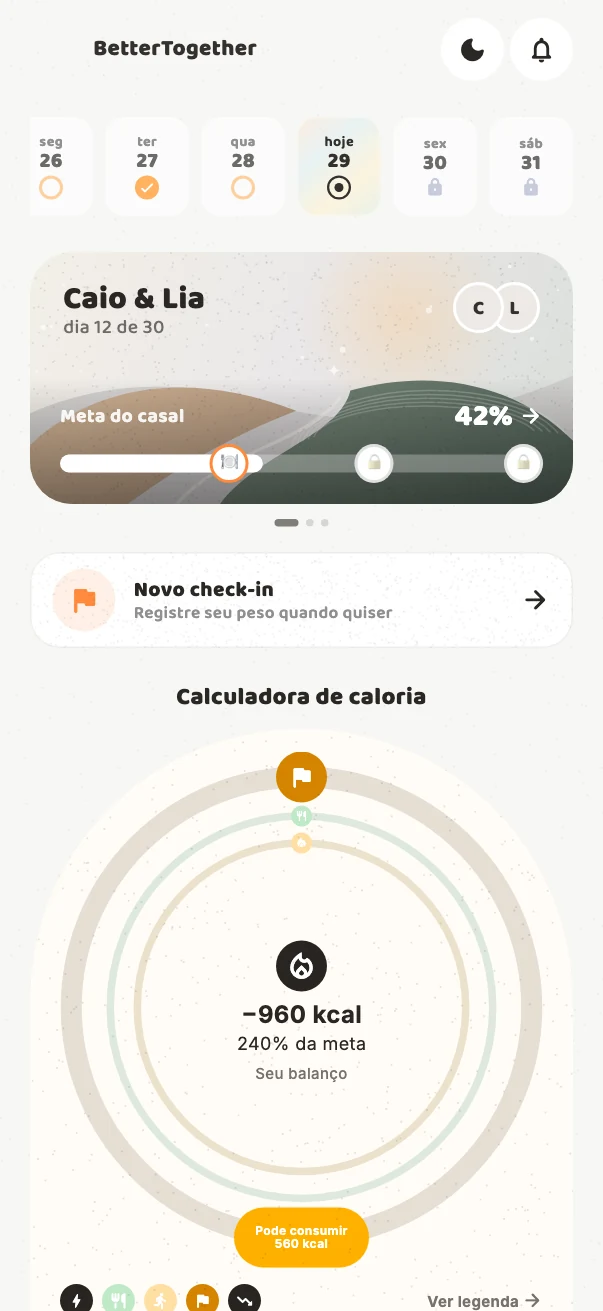
BetterTogether daily overview, shared journey and calorie balance.
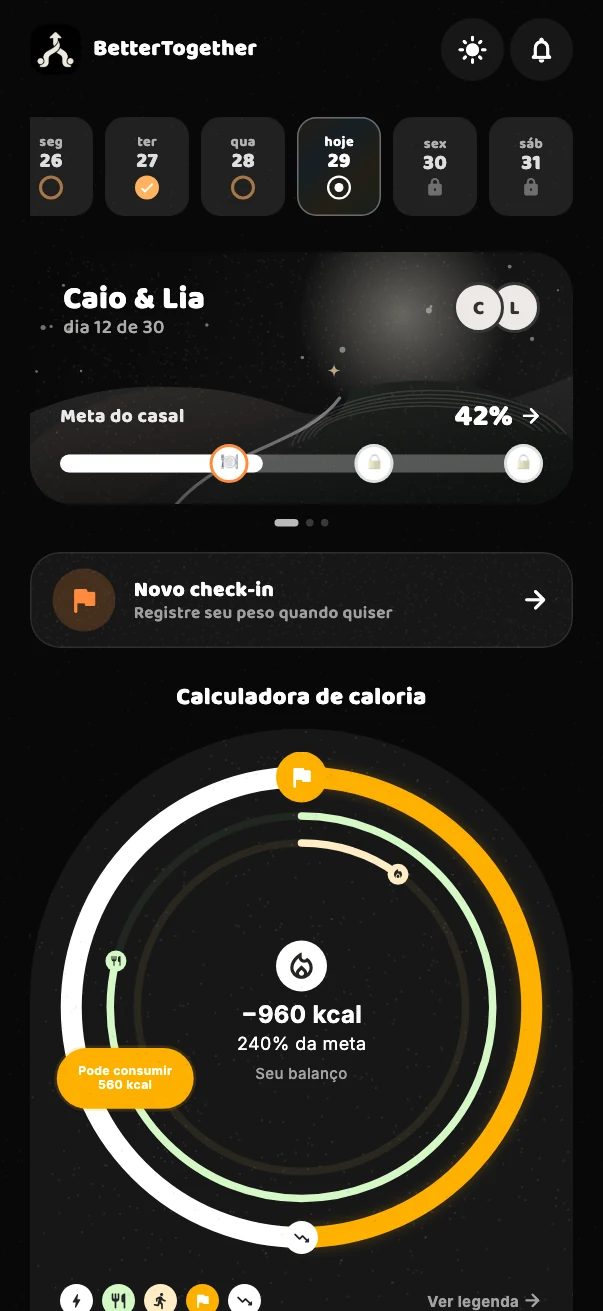
BetterTogether overview in dark mode.
Current app components with synthetic demonstration data. Current app interactions: daily overview, calorie balance and entry. Recorded from the actual app components using synthetic demonstration data.

01

My contribution

BetterTogether brings the small records of a daily routine into a shared challenge: mark a habit, add a meal’s calories, log exercise and return to see what changed. I worked on the product strategy, UX/UI and Flutter implementation.

The app gives each person a daily view while keeping the pair’s journey visible. The design work concentrates on the relationship between an action, its recorded result and the progress the interface shows next.
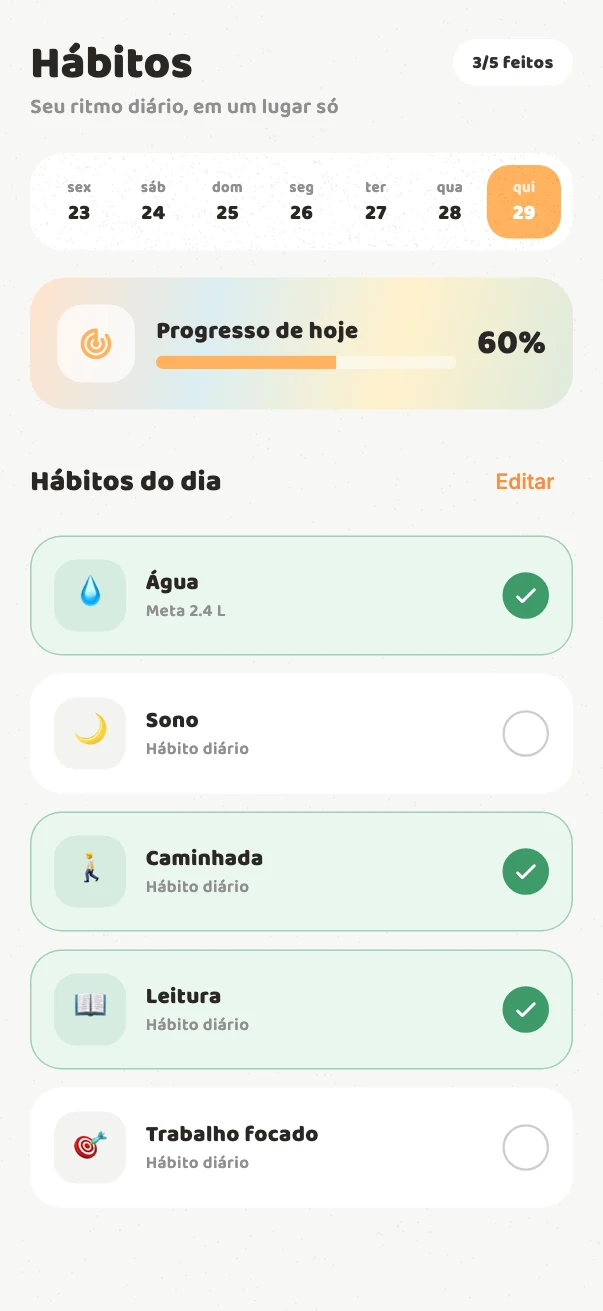
BetterTogether daily habits and completion states.
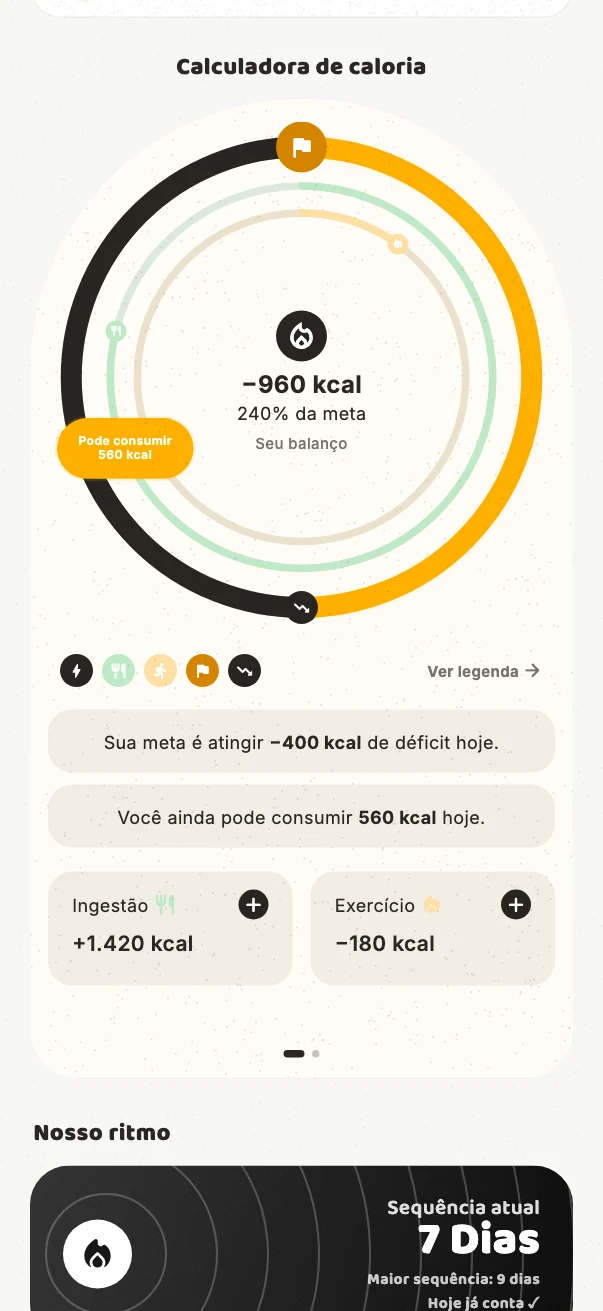
BetterTogether interactive calorie balance.
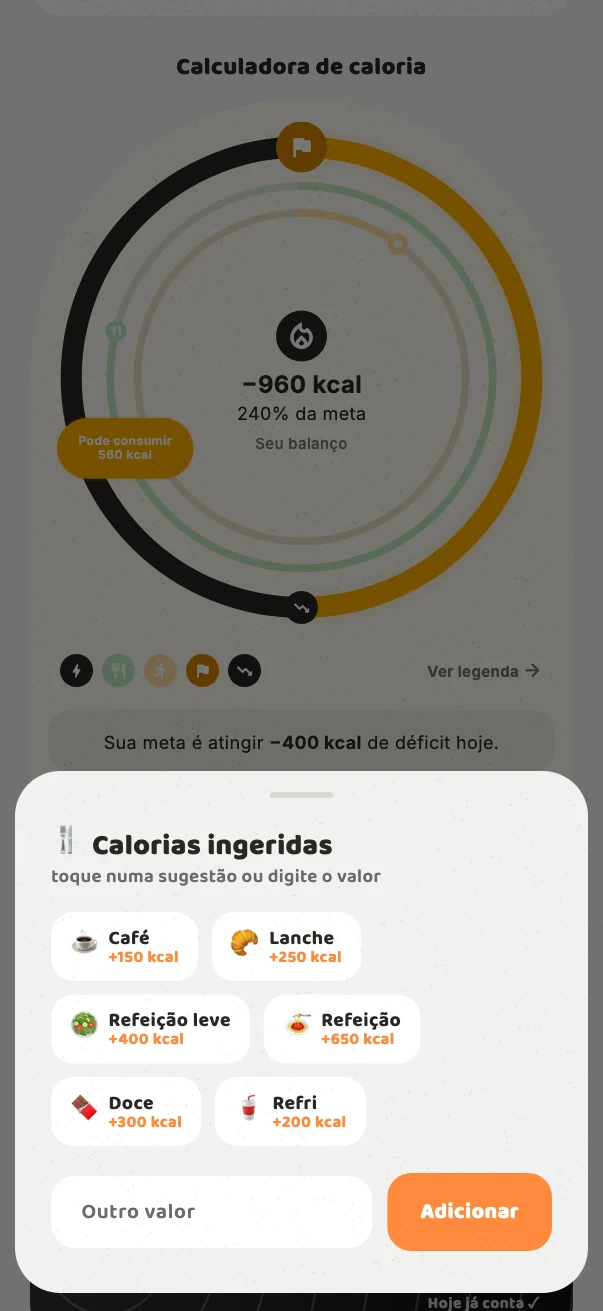
BetterTogether calorie entry sheet.
Current app components with synthetic demonstration data.

02

Give every entry a day

The date strip changes the dashboard’s habit records and calorie totals together. A person can return to a previous day, inspect its records and add an intake or exercise entry for that selected date.

Habits have their own focused screen, with a date selector and completion controls. A tap updates the state immediately; if saving fails, the app restores the previous state and explains that the record could not be saved.

03

Make the calorie calculation readable

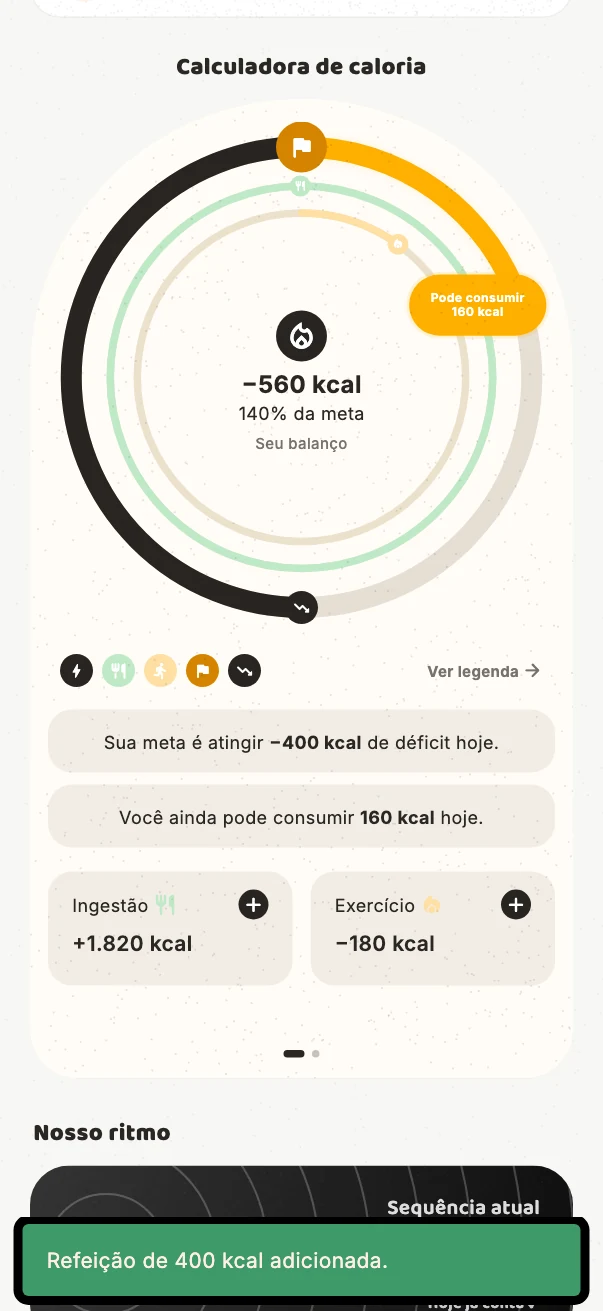
Intake and exercise are entered manually through a numerical sheet. The calculator brings those records into a visual relationship with the configured daily target, using a ring, a signed result and contextual guidance.

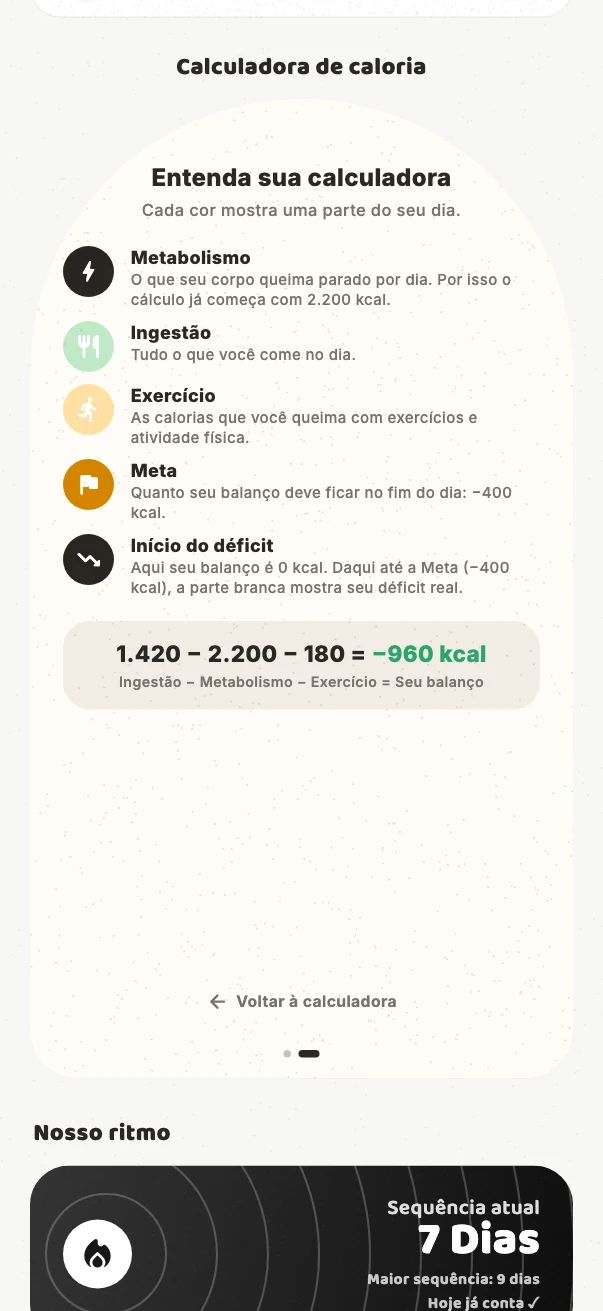
A second calculator view explains the terms behind the display: metabolism, intake, exercise and the target. Colour distinguishes progress, reaching the target and going beyond it. The person can inspect the calculation from the same component where the result appears.

BetterTogether calorie balance explanation.
BetterTogether challenge countdown card.
BetterTogether calorie balance after an entry.
Current app components with synthetic demonstration data.

04

Define what counts as a day together

The joint streak has a specific rule: each participant must complete at least one habit and record intake or exercise on the same day. The interface shows the current streak, the longest streak and whether today already counts.

A horizontal carousel keeps the challenge, countdown and locked reveal within reach. Rewards provide milestones along the shared journey. When the final reveal becomes available, it moves into a larger surface with a retrospective of the challenge.

05

Carry the feedback through the app

The implemented visual system uses neutral surfaces, warm orange, rounded typography and grain. Light and dark themes carry the same hierarchy across the dashboard, numerical sheets and progress views. Press feedback, changing numbers and page transitions connect the states.

Challenge settings also make data visibility explicit: private or shared between the participants. The creator controls that setting, and the invited person inherits it. My work connects these interface decisions to the Flutter app and its Supabase-backed records.

000

Instructions

Yan Fontão
Tap
Open a screen
Click
Open a screen
Drag
Look around the board
Wheel
Mouse zooms, trackpad moves, pinch zooms
− +
Pull back to see the whole board, or come closer
Arrows
In a case: ↑↓ change case, ←→ change media. On the board: move
Space
Open, or go back
Enter
Open
Esc Backspace
Back
Home
Back to the center, then the introduction
PgUp PgDn
Previous or next channel
Tab
Walk projects and links
R
Random project
0–9
Type a channel, 1–61
?
This page
Shortcuts

Music on the board

Files compressed and levelled for the web.

OPEN
TO WORK
Let’s talk

New message to Yan

Tell me who you are and I’ll get back to you.

000

About Yan

Hello, I’m Yan

Product Designer/ Design Engineer

Most products lose something between design and code. Mine don’t: I research the problem, design the product and ship the interface myself, so what you approve is exactly what your users get.

  • 2018started in software
  • UI + codedesign and implementation

Worked with Motorola · Ambev Tech · Rei do Pitaco · OneTool · CESAR

Brazil · Remote, hybrid or on-site

Portrait of Yan Fontão seated, in a green sweater and glasses, holding a microphone.
OPEN
TO WORK
Let’s talk
OPEN
TO WORK
Let’s talk
000

locked channel

Under NDA

Enter the code

Ask Yan for the code ↗
OPEN
TO WORK
Let’s talk
YAN FONTÃO Case studies

Channel 03 Habit tracking and shared routines

BetterTogether

A working app for couples to track habits, record calorie intake and exercise, and follow a shared challenge. Its daily dashboard connects individual entries to a joint streak, rewards and progress over time.

Contribution
Product strategy, UX/UI and implementation
Project status
Published Flutter Web/PWA
Period
2026
BetterTogether daily overview, shared journey and calorie balance.
Current app components with synthetic demonstration data.
Current app interactions: daily overview, calorie balance and entry. Recorded from the actual app components using synthetic demonstration data.
BetterTogether overview in dark mode.
Current app components with synthetic demonstration data.

Habits, meals and movement in one daily view

Current app components and interactions, demonstrated with synthetic data.

My contribution

BetterTogether brings the small records of a daily routine into a shared challenge: mark a habit, add a meal’s calories, log exercise and return to see what changed. I worked on the product strategy, UX/UI and Flutter implementation.

The app gives each person a daily view while keeping the pair’s journey visible. The design work concentrates on the relationship between an action, its recorded result and the progress the interface shows next.
Give every entry a day

The date strip changes the dashboard’s habit records and calorie totals together. A person can return to a previous day, inspect its records and add an intake or exercise entry for that selected date.

Habits have their own focused screen, with a date selector and completion controls. A tap updates the state immediately; if saving fails, the app restores the previous state and explains that the record could not be saved.

BetterTogether daily habits and completion states.
Current app components with synthetic demonstration data.

Make the calorie calculation readable

Intake and exercise are entered manually through a numerical sheet. The calculator brings those records into a visual relationship with the configured daily target, using a ring, a signed result and contextual guidance.

A second calculator view explains the terms behind the display: metabolism, intake, exercise and the target. Colour distinguishes progress, reaching the target and going beyond it. The person can inspect the calculation from the same component where the result appears.
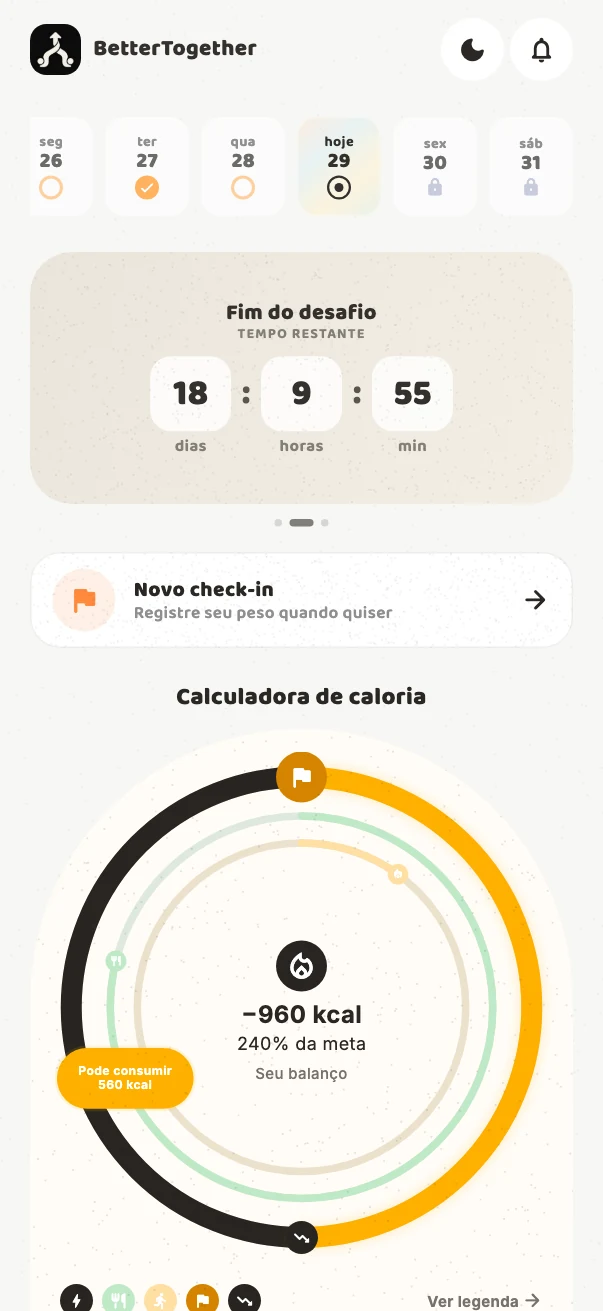
BetterTogether interactive calorie balance.
Current app components with synthetic demonstration data.
BetterTogether calorie entry sheet.
Current app components with synthetic demonstration data.
BetterTogether calorie balance explanation.
Current app components with synthetic demonstration data.

Define what counts as a day together

The joint streak has a specific rule: each participant must complete at least one habit and record intake or exercise on the same day. The interface shows the current streak, the longest streak and whether today already counts.

A horizontal carousel keeps the challenge, countdown and locked reveal within reach. Rewards provide milestones along the shared journey. When the final reveal becomes available, it moves into a larger surface with a retrospective of the challenge.

BetterTogether challenge countdown card.
Current app components with synthetic demonstration data.

Carry the feedback through the app

The implemented visual system uses neutral surfaces, warm orange, rounded typography and grain. Light and dark themes carry the same hierarchy across the dashboard, numerical sheets and progress views. Press feedback, changing numbers and page transitions connect the states.

Challenge settings also make data visibility explicit: private or shared between the participants. The creator controls that setting, and the invited person inherits it. My work connects these interface decisions to the Flutter app and its Supabase-backed records.

BetterTogether calorie balance after an entry.
Current app components with synthetic demonstration data.