Drag to explore. Scroll or pinch to zoom. Open Help for keyboard controls.

Yan
OPEN
TO WORK
Let’s talk
Yan Fontão Boring view
All work

Case 037AI product design and implementation

FormaAI

FormaAI is an AI workspace for turning audio, video and links into transcripts and structured insights. It uses a bring-your-own-key model, allowing people to connect providers and choose which service handles transcription and analysis.

Contribution
AI product design and implementation
Project status
In development
Recorded from the running interface. The backend was a local stand-in, so names, talks, summaries and keys are demonstration data; no AI service was called.
  1. Connect a provider
  2. Enable the provider
  3. Assign a task
Conceptual workflow, not an application screenshot.

01

Separate connection from the job to be done

Settings can become difficult to read when account connection, model selection and task assignment compete in the same place. FormaAI’s design gives each provider one card and separates the page into Providers, Usage and Language.

A provider card explains its capabilities, connection and model. The Usage section assigns transcription and analysis. This gives the page a sequence: connect and enable a provider, then choose its job.

The implementation filters the available task choices by capability and by whether a provider is both connected and enabled. An option therefore has to meet those conditions before it appears in the selector. The rule connects the interface’s promise to the application state.
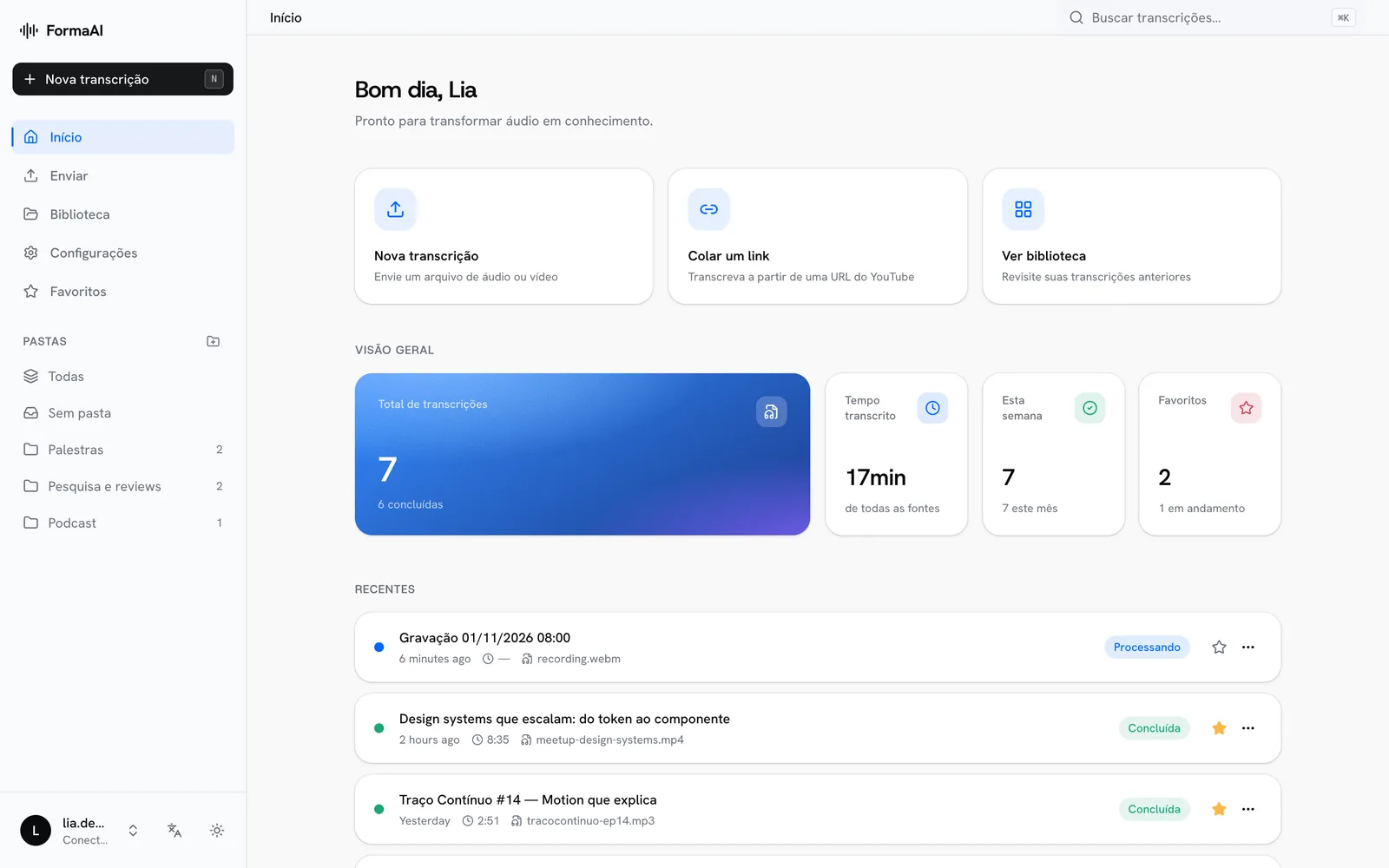
FormaAI dashboard with quick actions, overview figures and recent transcriptions.
The dashboard, with demonstration data.

02

Connected, enabled and active mean different things

A saved connection does not have to be used for every task. The design distinguishes a provider that is connected, one that is enabled and one currently selected for transcription or analysis.

Those states appear through labels and controls. Disabling a provider keeps its saved connection; removing a key is a separate action. This makes switching a service off less destructive and keeps the meaning of each control specific.

The design also puts model choice on the relevant provider card, where that decision has context. The task summary can then show which model the selected analysis provider will use.
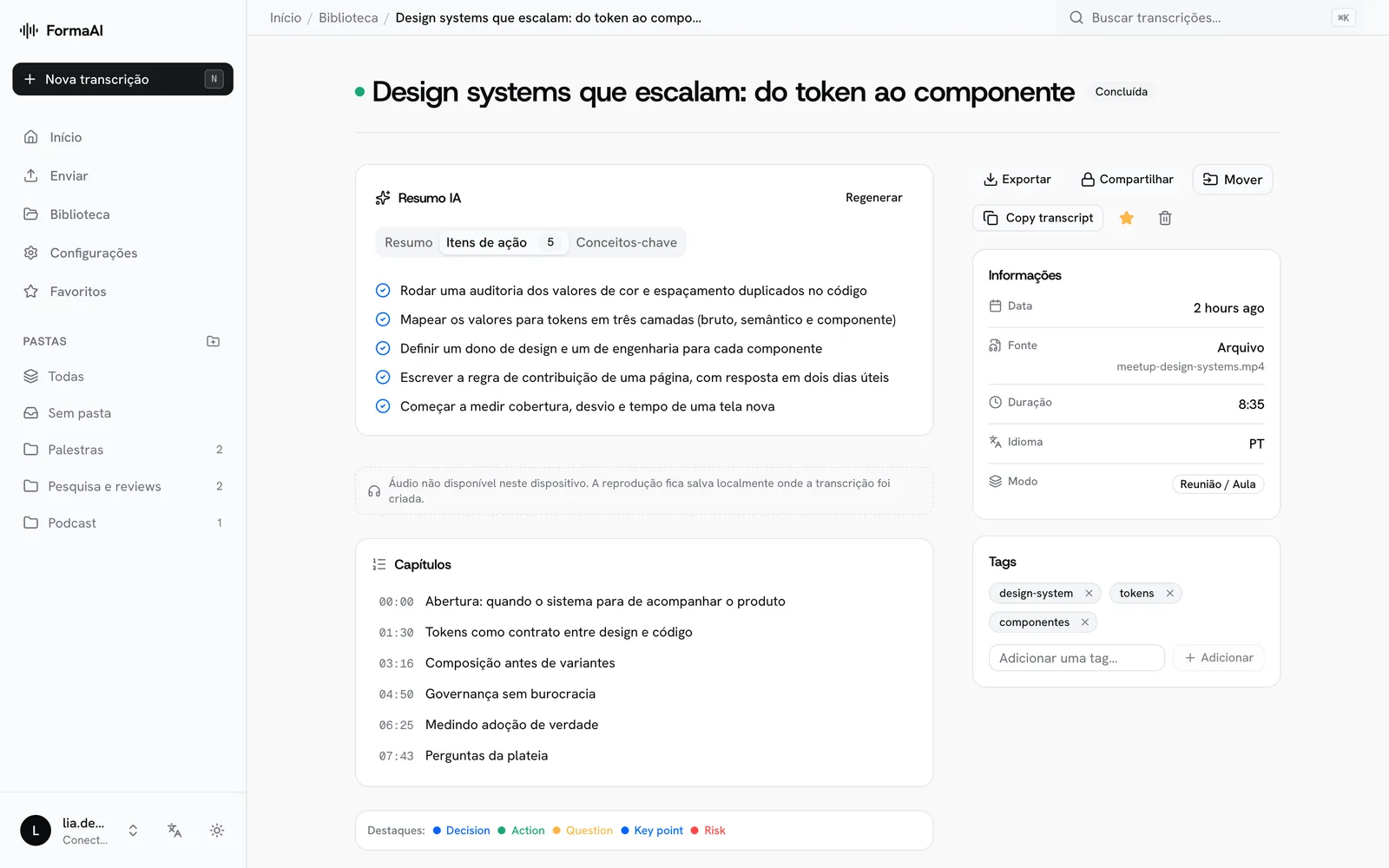
A transcription page with its AI summary, action items, chapters and tags.
A transcription and what is extracted from it. Content is hand-written demonstration data.

03

Let capability guide the experience

Transcription and analysis are separate jobs with different provider requirements. Treating them separately makes the system easier to extend without asking the person using it to understand the entire provider architecture.

It also makes limits easier to explain. The web product and the proposed local transcription experience are distinct tracks. The current case concentrates on the provider settings and web workflow represented in the code and design specification.
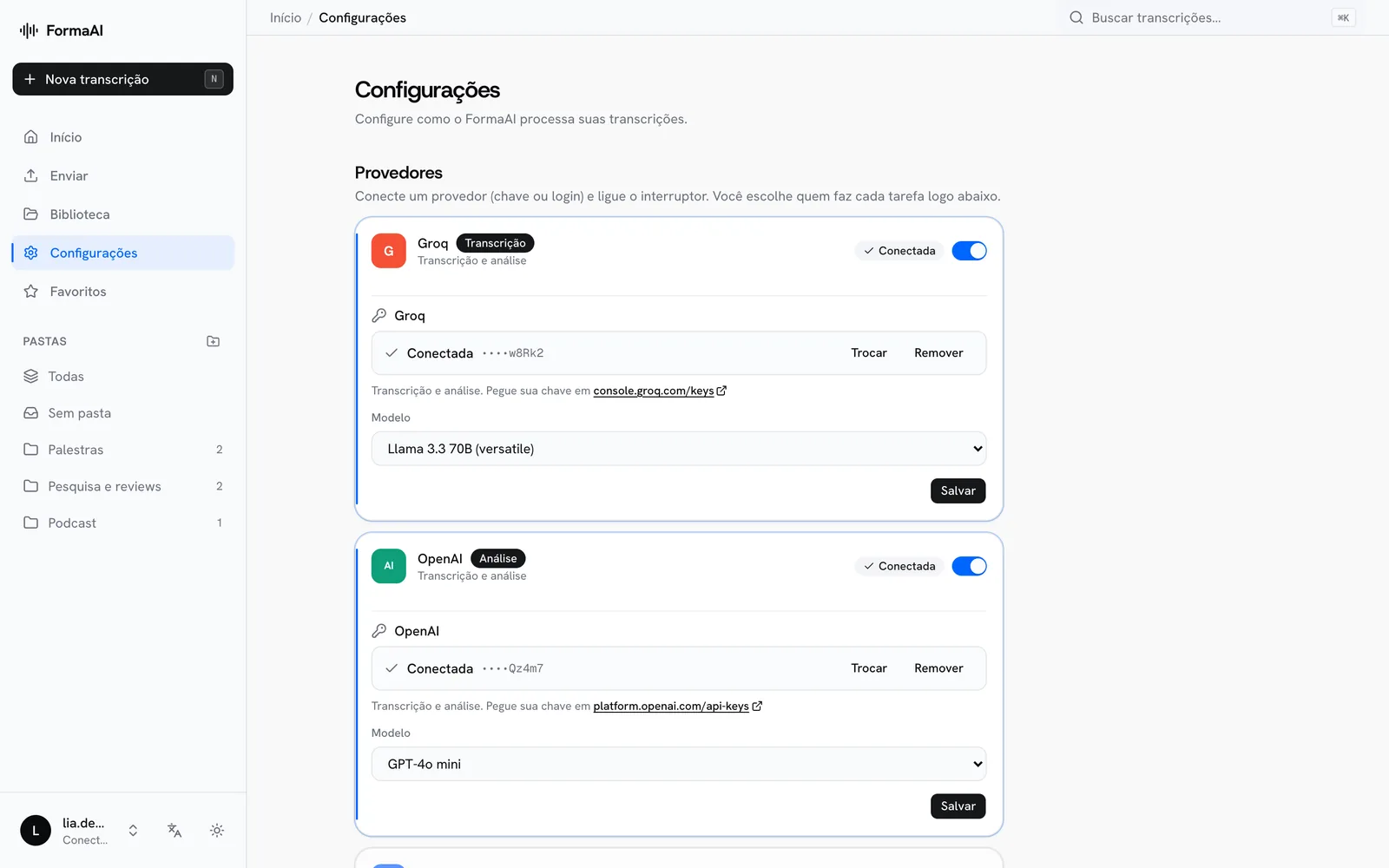
Provider settings: each provider has one card, and connected, enabled and active are separate states.
Provider settings, with placeholder keys.

04

Work demonstrated

The project combines an implemented web application with detailed settings design, provider capabilities and explicit launch preparation. Deployment configuration and external smoke tests remain separate from the work delivered in code.

The central contribution is the connection between an interaction model and its implementation: one place to manage each provider, a clear place to assign each task and visible states that describe what the product can currently use.

000

Instructions

Yan Fontão
Tap
Open a screen
Click
Open a screen
Drag
Look around the board
Wheel
Mouse zooms, trackpad moves, pinch zooms
− +
Pull back to see the whole board, or come closer
Arrows
In a case: ↑↓ change case, ←→ change media. On the board: move
Space
Open, or go back
Enter
Open
Esc Backspace
Back
Home
Back to the center, then the introduction
PgUp PgDn
Previous or next channel
Tab
Walk projects and links
R
Random project
0–9
Type a channel, 1–61
?
This page
Shortcuts

Music on the board

Files compressed and levelled for the web.

OPEN
TO WORK
Let’s talk

New message to Yan

Tell me who you are and I’ll get back to you.

000

About Yan

Hello, I’m Yan

Product Designer/ Design Engineer

Most products lose something between design and code. Mine don’t: I research the problem, design the product and ship the interface myself, so what you approve is exactly what your users get.

  • 2018started in software
  • UI + codedesign and implementation

Worked with Motorola · Ambev Tech · Rei do Pitaco · OneTool · CESAR

Brazil · Remote, hybrid or on-site

Portrait of Yan Fontão seated, in a green sweater and glasses, holding a microphone.
OPEN
TO WORK
Let’s talk
OPEN
TO WORK
Let’s talk
000

locked channel

Under NDA

Enter the code

Ask Yan for the code ↗
OPEN
TO WORK
Let’s talk
YAN FONTÃO Case studies

Channel 37 AI product design and implementation

FormaAI

FormaAI is an AI workspace for turning audio, video and links into transcripts and structured insights. It uses a bring-your-own-key model, allowing people to connect providers and choose which service handles transcription and analysis.

Contribution
AI product design and implementation
Project status
In development
Recorded from the running interface. The backend was a local stand-in, so names, talks, summaries and keys are demonstration data; no AI service was called.

FormaAI: make control over AI understandable

Recorded from the running interface with synthetic data.

Separate connection from the job to be done

Settings can become difficult to read when account connection, model selection and task assignment compete in the same place. FormaAI’s design gives each provider one card and separates the page into Providers, Usage and Language.

A provider card explains its capabilities, connection and model. The Usage section assigns transcription and analysis. This gives the page a sequence: connect and enable a provider, then choose its job.

The implementation filters the available task choices by capability and by whether a provider is both connected and enabled. An option therefore has to meet those conditions before it appears in the selector. The rule connects the interface’s promise to the application state.

FormaAI dashboard with quick actions, overview figures and recent transcriptions.
The dashboard, with demonstration data.

Connected, enabled and active mean different things

A saved connection does not have to be used for every task. The design distinguishes a provider that is connected, one that is enabled and one currently selected for transcription or analysis.

Those states appear through labels and controls. Disabling a provider keeps its saved connection; removing a key is a separate action. This makes switching a service off less destructive and keeps the meaning of each control specific.

The design also puts model choice on the relevant provider card, where that decision has context. The task summary can then show which model the selected analysis provider will use.

A transcription page with its AI summary, action items, chapters and tags.
A transcription and what is extracted from it. Content is hand-written demonstration data.

Let capability guide the experience

Transcription and analysis are separate jobs with different provider requirements. Treating them separately makes the system easier to extend without asking the person using it to understand the entire provider architecture.

It also makes limits easier to explain. The web product and the proposed local transcription experience are distinct tracks. The current case concentrates on the provider settings and web workflow represented in the code and design specification.

Provider settings: each provider has one card, and connected, enabled and active are separate states.
Provider settings, with placeholder keys.

Work demonstrated

The project combines an implemented web application with detailed settings design, provider capabilities and explicit launch preparation. Deployment configuration and external smoke tests remain separate from the work delivered in code.

The central contribution is the connection between an interaction model and its implementation: one place to manage each provider, a clear place to assign each task and visible states that describe what the product can currently use.