Drag to explore. Scroll or pinch to zoom. Open Help for keyboard controls.

Yan
OPEN
TO WORK
Let’s talk
Yan Fontão Boring view
All work

Case 005Commerce platform and product design

MeuCommerce

A commerce platform for sellers who close orders through WhatsApp. Selsa Select, its first store and design partner, connects a browsable catalog, saved products and a cart to a structured conversation with the seller.

Contribution
Founder, product strategy, UX/UI and development
Project status
Implemented platform
Screens captured from the running product, shown in sequence: the panel with names and values hidden, the theme picker, and the same store in eight themes.

01

My contribution

The starting point was a real seller managing products, prices and sales through a notebook and WhatsApp. The product needed to give that operation a searchable catalog and a coherent buying journey while preserving the conversation where orders are agreed.

I developed the product strategy, UX/UI and implementation. MeuCommerce is the platform; Selsa Select is the store shown in this case. Its merchandise and product artwork belong to the respective brands and suppliers.
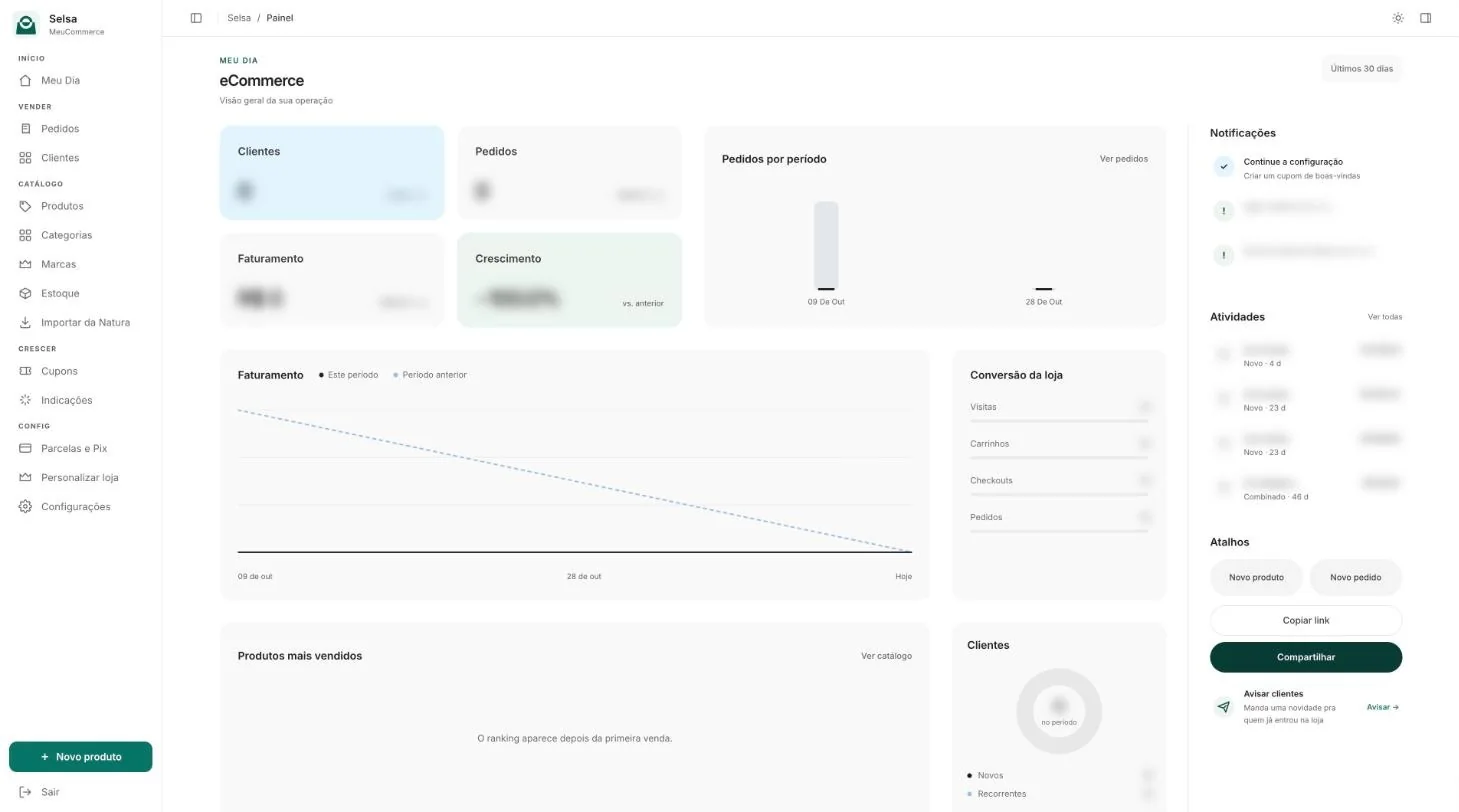
The seller’s panel: indicators, revenue chart, store conversion, notifications and shortcuts, with values hidden.
The seller’s panel, captured from the product. Names and values hidden.

02

Connect the seller’s work to the storefront

The platform separates the seller’s administration from the customer-facing store. Product information and commercial conditions feed a public catalog that can be shared by link.

The panel opens on the seller’s day: customers, orders, revenue and growth, the store’s conversion, notifications for low stock, the latest orders and shortcuts to add a product or share the store.

Selsa Select brings several merchandise categories into one storefront. Search, product cards, favourites and recently viewed items give customers ways to find an item, compare it and return later. Each route keeps the store context as the person moves toward a purchase.
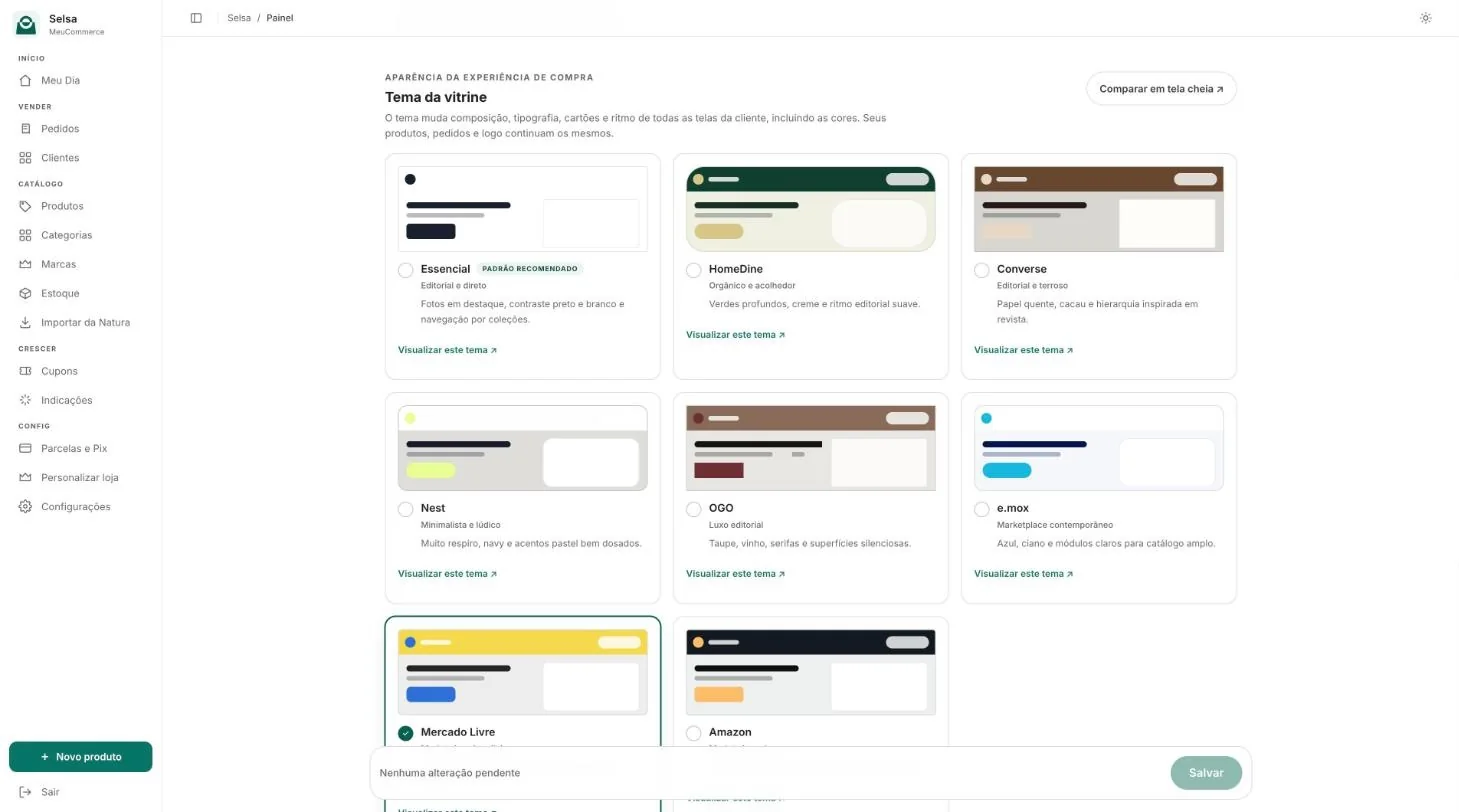
Theme picker inside the panel, with eight storefront themes to choose from.
The seller picks a theme from the panel.

03

Change the look, keep the store

A store is not tied to one appearance. In the panel the seller chooses between eight storefront themes, and each one changes the composition, typography, cards, colours and rhythm of every customer screen. The products, orders and logo stay the same.

A comparison page opens each direction in full, from a quiet minimal catalog to a dense marketplace, so the seller decides by looking at their own store and can switch again later.
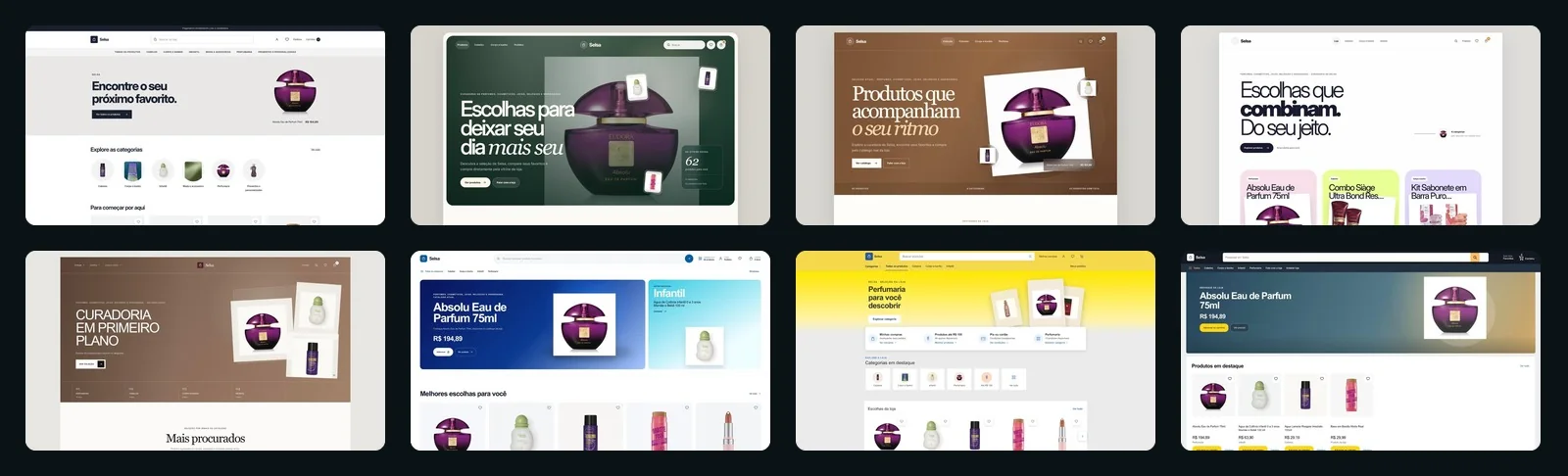
The same store in eight storefront themes.
One store, eight themes. The products stay the same.

04

Keep the conditions with the product

A product card has to carry more than an image and a name. Current price, previous price, discounts, Pix and instalments need a readable hierarchy that also works when some of those conditions are absent.

The mobile refinement groups the available conditions beside the product image and removes empty space reserved for missing fields. The recently viewed section uses a continuous surface with separated rows, while leaving room for the favourite control and floating WhatsApp action.

Recorded on a live store, with its real loading states. It stops at the cart; no order was placed. Product photos and brands belong to their owners.

05

Turn the cart into a useful conversation

The cart lets the customer change quantities, remove items and apply a coupon before reviewing the summary. The server recalculates the quote so the displayed conditions and the generated order message share the same source.

Checkout prepares a structured WhatsApp message with the selected items and order summary. The seller can continue the conversation with the order already organised. Payment is arranged outside the platform, so the interface keeps that handoff explicit.
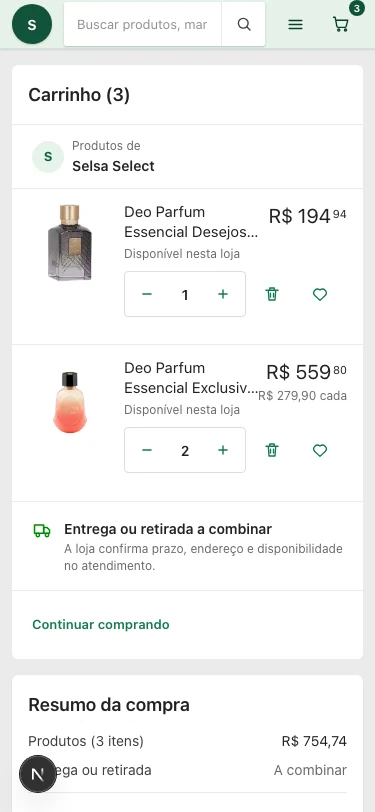
Selsa Select mobile shopping cart on MeuCommerce.
Selsa Select storefront implemented on MeuCommerce.
The same flow in a phone-sized browser, driven by touch. Recorded in an emulated viewport, not on a device. Actual local product QA capture. Visible prices belong to the store catalog; no personal financial account is shown. Actual local QA capture of the implemented storefront. Product imagery belongs to the respective brands.

06

Support the moments around checkout

Saved products, orders and account controls extend the experience beyond a single cart. Empty states lead back to the store; loading, coupon errors and expired sessions need their own response instead of an apparent success.

The implementation work includes responsive refinements and recorded checks of the storefront and cart on desktop and mobile. The case shows the resulting product surfaces and their interaction decisions; it makes no claim of a measured sales or conversion increase.

000

Instructions

Yan Fontão
Tap
Open a screen
Click
Open a screen
Drag
Look around the board
Wheel
Mouse zooms, trackpad moves, pinch zooms
− +
Pull back to see the whole board, or come closer
Arrows
In a case: ↑↓ change case, ←→ change media. On the board: move
Space
Open, or go back
Enter
Open
Esc Backspace
Back
Home
Back to the center, then the introduction
PgUp PgDn
Previous or next channel
Tab
Walk projects and links
R
Random project
0–9
Type a channel, 1–61
?
This page
Shortcuts

Music on the board

Files compressed and levelled for the web.

OPEN
TO WORK
Let’s talk

New message to Yan

Tell me who you are and I’ll get back to you.

000

About Yan

Hello, I’m Yan

Product Designer/ Design Engineer

Most products lose something between design and code. Mine don’t: I research the problem, design the product and ship the interface myself, so what you approve is exactly what your users get.

  • 2018started in software
  • UI + codedesign and implementation

Worked with Motorola · Ambev Tech · Rei do Pitaco · OneTool · CESAR

Brazil · Remote, hybrid or on-site

Portrait of Yan Fontão seated, in a green sweater and glasses, holding a microphone.
OPEN
TO WORK
Let’s talk
OPEN
TO WORK
Let’s talk
000

locked channel

Under NDA

Enter the code

Ask Yan for the code ↗
OPEN
TO WORK
Let’s talk
YAN FONTÃO Case studies

Channel 05 Commerce platform and product design

MeuCommerce

A commerce platform for sellers who close orders through WhatsApp. Selsa Select, its first store and design partner, connects a browsable catalog, saved products and a cart to a structured conversation with the seller.

Contribution
Founder, product strategy, UX/UI and development
Project status
Implemented platform
Period
2026
Screens captured from the running product, shown in sequence: the panel with names and values hidden, the theme picker, and the same store in eight themes.

From a shared catalog to a WhatsApp order

Captured from the running product, with the panel’s names and values hidden. Product photos and brands belong to their owners.

My contribution

The starting point was a real seller managing products, prices and sales through a notebook and WhatsApp. The product needed to give that operation a searchable catalog and a coherent buying journey while preserving the conversation where orders are agreed.

I developed the product strategy, UX/UI and implementation. MeuCommerce is the platform; Selsa Select is the store shown in this case. Its merchandise and product artwork belong to the respective brands and suppliers.

The seller’s panel: indicators, revenue chart, store conversion, notifications and shortcuts, with values hidden.
The seller’s panel, captured from the product. Names and values hidden.

Connect the seller’s work to the storefront

The platform separates the seller’s administration from the customer-facing store. Product information and commercial conditions feed a public catalog that can be shared by link.

The panel opens on the seller’s day: customers, orders, revenue and growth, the store’s conversion, notifications for low stock, the latest orders and shortcuts to add a product or share the store.

Selsa Select brings several merchandise categories into one storefront. Search, product cards, favourites and recently viewed items give customers ways to find an item, compare it and return later. Each route keeps the store context as the person moves toward a purchase.

Theme picker inside the panel, with eight storefront themes to choose from.
The seller picks a theme from the panel.
The same store in eight storefront themes.
One store, eight themes. The products stay the same.

Change the look, keep the store

A store is not tied to one appearance. In the panel the seller chooses between eight storefront themes, and each one changes the composition, typography, cards, colours and rhythm of every customer screen. The products, orders and logo stay the same.

A comparison page opens each direction in full, from a quiet minimal catalog to a dense marketplace, so the seller decides by looking at their own store and can switch again later.

The same flow in a phone-sized browser, driven by touch. Recorded in an emulated viewport, not on a device.
Recorded on a live store, with its real loading states. It stops at the cart; no order was placed. Product photos and brands belong to their owners.

Keep the conditions with the product

A product card has to carry more than an image and a name. Current price, previous price, discounts, Pix and instalments need a readable hierarchy that also works when some of those conditions are absent.

The mobile refinement groups the available conditions beside the product image and removes empty space reserved for missing fields. The recently viewed section uses a continuous surface with separated rows, while leaving room for the favourite control and floating WhatsApp action.

Selsa Select mobile shopping cart on MeuCommerce.
Actual local product QA capture. Visible prices belong to the store catalog; no personal financial account is shown.

Turn the cart into a useful conversation

The cart lets the customer change quantities, remove items and apply a coupon before reviewing the summary. The server recalculates the quote so the displayed conditions and the generated order message share the same source.

Checkout prepares a structured WhatsApp message with the selected items and order summary. The seller can continue the conversation with the order already organised. Payment is arranged outside the platform, so the interface keeps that handoff explicit.
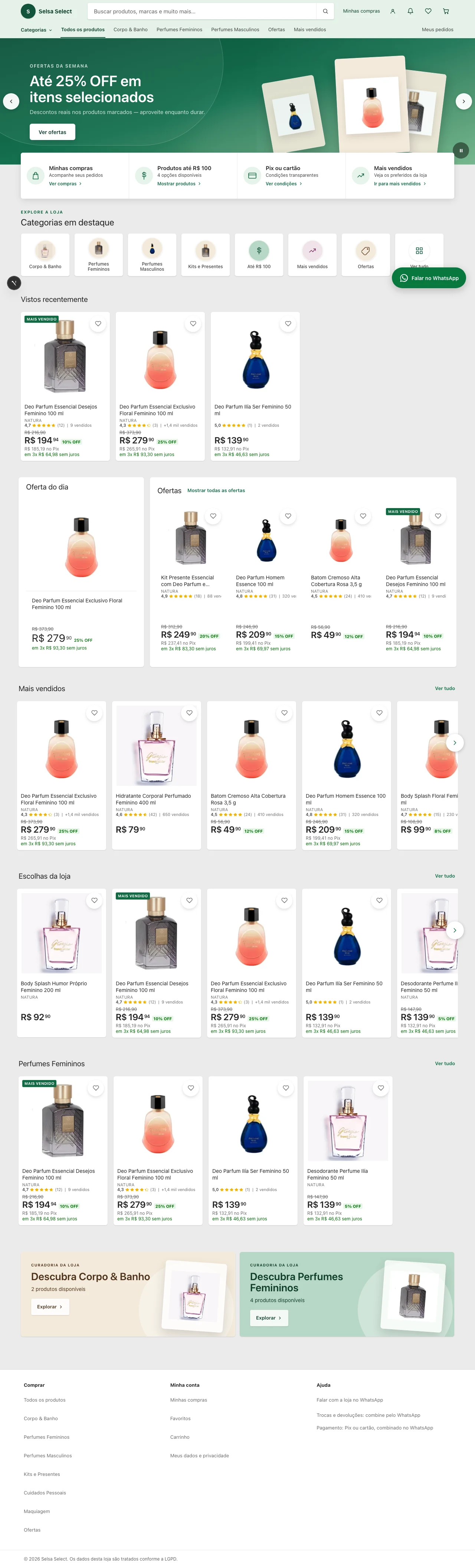
Selsa Select storefront implemented on MeuCommerce.
Actual local QA capture of the implemented storefront. Product imagery belongs to the respective brands.

Support the moments around checkout

Saved products, orders and account controls extend the experience beyond a single cart. Empty states lead back to the store; loading, coupon errors and expired sessions need their own response instead of an apparent success.

The implementation work includes responsive refinements and recorded checks of the storefront and cart on desktop and mobile. The case shows the resulting product surfaces and their interaction decisions; it makes no claim of a measured sales or conversion increase.