Drag to explore. Scroll or pinch to zoom. Open Help for keyboard controls.

Yan
OPEN
TO WORK
Let’s talk
Yan Fontão Boring view
All work

Case 041Personal-finance product

Financias

Financias is a personal-finance tool for recording income, paid expenses, transfers and upcoming bills. The design starts with a distinction that affects every screen: money that has moved and money that is still due.

Contribution
Product design and implementation
Project status
Live product · Personal data concealed

A 3D piggy bank with a coin dropping into its slot.
A 3D object made for this board.

01

An overview that leads to the next action

The published overview separates the current balance, payments that need attention and the month’s spending rhythm. Income and spending charts sit below those immediate decisions, followed by shortcuts for the different kinds of record.

Recording a paid expense, planning a bill and moving money between accounts begin with distinct actions. This makes the product’s financial model visible before a person fills in a form.

The interface shown here was captured from the running product. Monetary amounts were concealed before capture, preserving the layout and controls while keeping personal values out of the case.

Recorded product interaction: overview, charts, upcoming payments and registration choices. Financial values and personal details were blurred before recording.

02

Different actions need different language

A paid expense reduces a balance. An upcoming bill represents a commitment, with its own due date, until payment is confirmed. A transfer moves money between the same person’s accounts and should not appear as new income or spending.

Those rules shape both the interface and the data model. Financias gives the actions distinct names and uses onboarding to explain them with short examples. The first-use flow starts with an account, introduces the four essential record types and leads into a real entry that the person reviews before saving.

Help remains available afterwards. Reopening it explains the product without creating financial records or resetting progress.
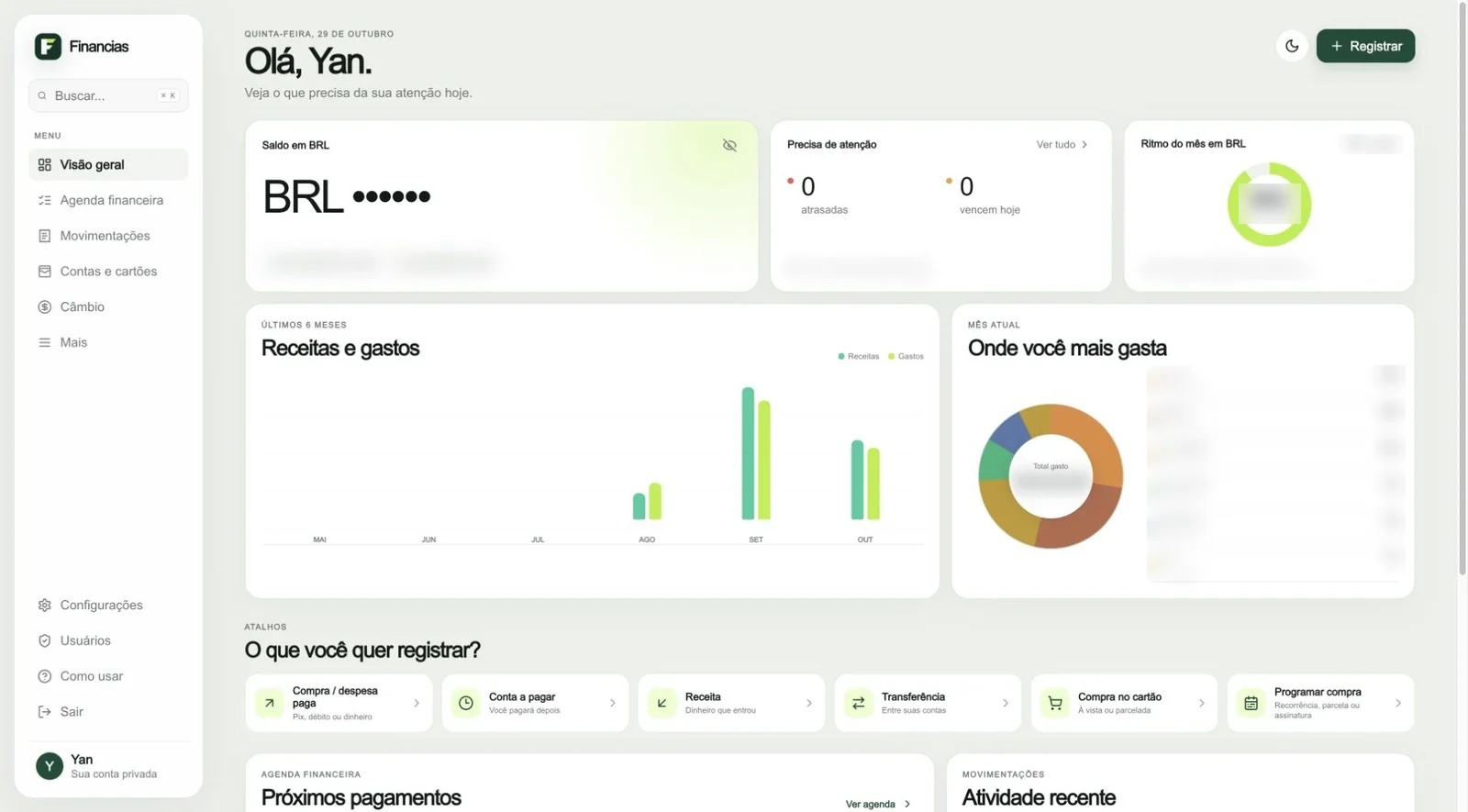
Financias overview with all monetary amounts concealed.
Live interface capture. Monetary amounts were blurred before capture; the balance uses the product’s privacy control.

03

Make a confirmation mean one payment

The payment flow records the effective date, paid amount and chosen account, then links the bill to the resulting transaction. Repeating the same confirmation must preserve one active payment and one effect on the balance.

That requirement connects a visible action to a software invariant. The interface can present a simple confirmation because the underlying operation is designed to keep the bill and its transaction consistent.

The same attention carries into the overview. Upcoming commitments remain separate from completed spending. Totals in different currencies remain separate as well, so a combined number does not imply that reais, dollars and euros are interchangeable.

04

Keep personal records personal

Each financial record belongs to one account owner. Access management is separate from permission to inspect someone else’s financial information. The product does not introduce a shared family ledger or transfers between users.

This boundary gives the application a clear scope while allowing the interface to focus on the person’s own accounts, due dates and next action.

Financias wordmark and F symbol on a dark green background.
Financias brand identity card.

05

What this project shows

Financias connects everyday language to precise financial behaviour. Its strongest design decisions are visible in the distinctions the product preserves: paid and pending, transfer and expense, one currency and another, personal data and administrative access.

000

Instructions

Yan Fontão
Tap
Open a screen
Click
Open a screen
Drag
Look around the board
Wheel
Mouse zooms, trackpad moves, pinch zooms
− +
Pull back to see the whole board, or come closer
Arrows
In a case: ↑↓ change case, ←→ change media. On the board: move
Space
Open, or go back
Enter
Open
Esc Backspace
Back
Home
Back to the center, then the introduction
PgUp PgDn
Previous or next channel
Tab
Walk projects and links
R
Random project
0–9
Type a channel, 1–61
?
This page
Shortcuts

Music on the board

Files compressed and levelled for the web.

OPEN
TO WORK
Let’s talk

New message to Yan

Tell me who you are and I’ll get back to you.

000

About Yan

Hello, I’m Yan

Product Designer/ Design Engineer

Most products lose something between design and code. Mine don’t: I research the problem, design the product and ship the interface myself, so what you approve is exactly what your users get.

  • 2018started in software
  • UI + codedesign and implementation

Worked with Motorola · Ambev Tech · Rei do Pitaco · OneTool · CESAR

Brazil · Remote, hybrid or on-site

Portrait of Yan Fontão seated, in a green sweater and glasses, holding a microphone.
OPEN
TO WORK
Let’s talk
OPEN
TO WORK
Let’s talk
000

locked channel

Under NDA

Enter the code

Ask Yan for the code ↗
OPEN
TO WORK
Let’s talk
YAN FONTÃO Case studies

Channel 41 Personal-finance product

Financias

Financias is a personal-finance tool for recording income, paid expenses, transfers and upcoming bills. The design starts with a distinction that affects every screen: money that has moved and money that is still due.

Contribution
Product design and implementation
Project status
Live product · Personal data concealed
A 3D piggy bank with a coin dropping into its slot.
A 3D object made for this board.

Financias: make the meaning of a balance clear

Recorded product interaction. Financial values and personal details concealed.

Flow summary
  1. Record an upcoming bill
  2. Confirm one payment
  3. Update the balance

An overview that leads to the next action

The published overview separates the current balance, payments that need attention and the month’s spending rhythm. Income and spending charts sit below those immediate decisions, followed by shortcuts for the different kinds of record.

Recording a paid expense, planning a bill and moving money between accounts begin with distinct actions. This makes the product’s financial model visible before a person fills in a form.

The interface shown here was captured from the running product. Monetary amounts were concealed before capture, preserving the layout and controls while keeping personal values out of the case.

Recorded product interaction: overview, charts, upcoming payments and registration choices. Financial values and personal details were blurred before recording.

Different actions need different language

A paid expense reduces a balance. An upcoming bill represents a commitment, with its own due date, until payment is confirmed. A transfer moves money between the same person’s accounts and should not appear as new income or spending.

Those rules shape both the interface and the data model. Financias gives the actions distinct names and uses onboarding to explain them with short examples. The first-use flow starts with an account, introduces the four essential record types and leads into a real entry that the person reviews before saving.

Help remains available afterwards. Reopening it explains the product without creating financial records or resetting progress.

Financias overview with all monetary amounts concealed.
Live interface capture. Monetary amounts were blurred before capture; the balance uses the product’s privacy control.

Make a confirmation mean one payment

The payment flow records the effective date, paid amount and chosen account, then links the bill to the resulting transaction. Repeating the same confirmation must preserve one active payment and one effect on the balance.

That requirement connects a visible action to a software invariant. The interface can present a simple confirmation because the underlying operation is designed to keep the bill and its transaction consistent.

The same attention carries into the overview. Upcoming commitments remain separate from completed spending. Totals in different currencies remain separate as well, so a combined number does not imply that reais, dollars and euros are interchangeable.

Keep personal records personal

Each financial record belongs to one account owner. Access management is separate from permission to inspect someone else’s financial information. The product does not introduce a shared family ledger or transfers between users.

This boundary gives the application a clear scope while allowing the interface to focus on the person’s own accounts, due dates and next action.

Financias wordmark and F symbol on a dark green background.
Financias brand identity card.

What this project shows

Financias connects everyday language to precise financial behaviour. Its strongest design decisions are visible in the distinctions the product preserves: paid and pending, transfer and expense, one currency and another, personal data and administrative access.